Documentation
ADvantage Premiere® Password Manager (SSPR) Documentation
Reports
All Users
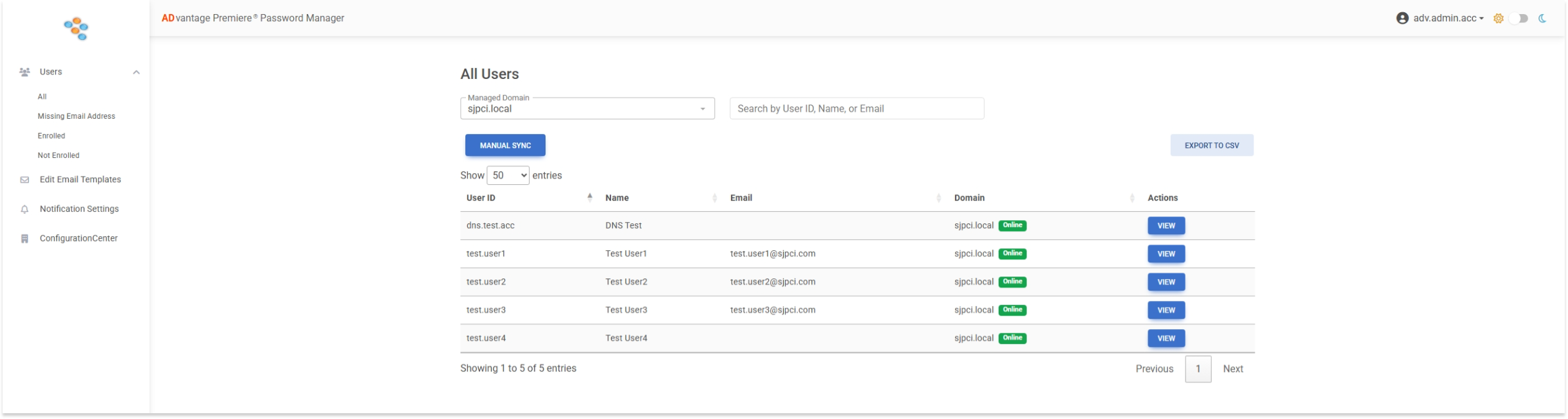
The All Users report displays all enabled users within the selected Active Directory domain.
Disabled user accounts will not appear in this report.
Upon initial deployment of ADvantage Premiere® Password Manager, the user list may appear empty until the first synchronization has completed. If needed, a manual synchronization can be initiated at any time by selecting the MANUAL SYNC button.
This report can be used to:
- Verify synchronized Active Directory users (this is automated every 15 minutes)
- Confirm user visibility within the selected domain
- Validate synchronization and deployment status
The report can also be exported to CSV format by clicking the EXPORT TO CSV button.